If you spend any time around modern data stacks, when should I use what tools, and if there are so many tools, which one should I use when my option is restricted? The question is understandable. In this case, we want to give our own personal experience, about two tools that we are using often. One is Apache Hop and one is dbt. Both tools come up in conversations about data transformation, both are open source, and both have active communities. Search for either one and you will find it described as a way to transform data.
But the “versus” framing is slightly misleading, because Hop and dbt are not really competitors. They live on different layers of the data pipeline and were designed around different problems. There is a genuine overlap in the middle, transformation, and that overlap is worth understanding properly.
So in this article we will do exactly that: explain what each tool does, zoom in on how each one handles transformation, compare their strengths honestly, and finish with practical guidance on when to pick which. The short answer, spoiler, is that they can and arguably should be used together, but there are situations where you will want one over the other.
What Apache Hop does
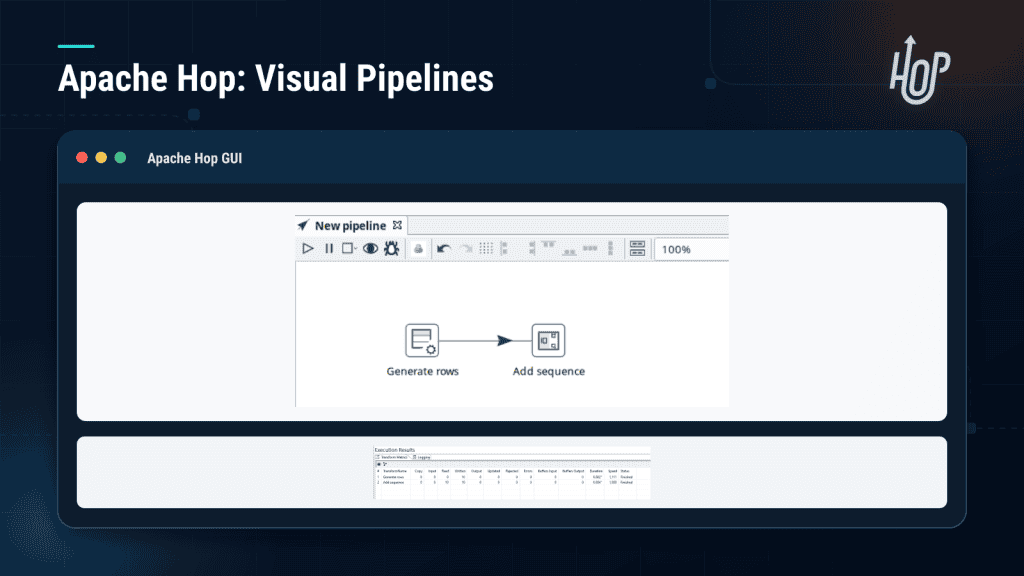
Apache Hop (Hop Orchestration Platform) is a free, open-source data integration and orchestration platform, hosted by the Apache Software Foundation and built by the original creators of Kettle and Pentaho Data Integration. It covers the full journey of data from source to destination:
- Extract data from databases, files (CSV, Excel, JSON, XML, Parquet, fixed-width text), APIs and web services, SFTP servers, message queues, NoSQL stores, and cloud storage such as S3, GCS, and Azure.
- Transform that data as it flows: clean it, filter it, join it, aggregate it, enrich it.
- Load it into any of the same range of targets.
- Orchestrate the whole thing with workflows that decide when pipelines run, in what order, and what happens when something fails.
You design pipelines visually in Hop GUI by dragging transforms onto a canvas and wiring them together, and the same pipeline can run on your laptop, on a server, or on big-data runtimes like Spark, Flink, Google Cloud Dataflow, and AWS EMR through Apache Beam, without rewriting anything. Projects are stored as folders of JSON files, which makes them Git-native, and everything is licensed under Apache 2.0, free to use commercially with no per-user fees.
In one sentence: Hop is an end-to-end tool for moving and transforming data between systems.
What dbt does
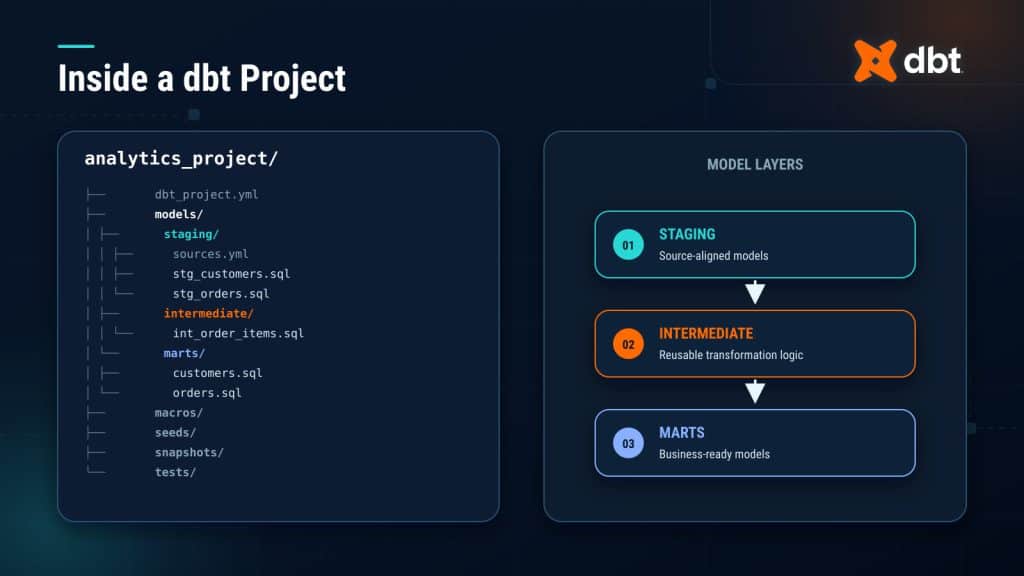
dbt (data build tool) is a transformation framework originally created by Fishtown Analytics, the company now known as dbt Labs. It takes a deliberately narrow slice of the data problem: it transforms data that already lives in a warehouse.
With dbt, you write SQL SELECT statements called models. dbt compiles those models, works out the dependencies between them through references like ref(), runs them in the right order inside your warehouse, and materializes each one as a view, a table, or an incremental model. On top of that you get Jinja templating, reusable macros, a package ecosystem, data tests, auto-generated documentation, and a lineage graph of how every model relates to every other model.
The licensing story deserves a short note, because it changed recently. The current generation of dbt (v2, a ground-up rewrite in Rust) ships in two distributions. Fusion is the default install: free to use and run locally, but proprietary, with some advanced capabilities unlocked by a free sign-in or a paid account. dbt Core 2.0 is the fully open-source Apache 2.0 distribution of the same engine, positioned by dbt itself as the option for organizations with a strict open-source requirement. The older Python-based dbt Core v1.x remains available and still Apache 2.0. On top of all this sits the dbt platform (formerly dbt Cloud), the commercial hosted product with scheduling, CI, and a web IDE. The practical takeaway: dbt is still free for everyday use, but if a fully open-source stack matters to you, pay attention to which distribution you are actually running.
Just as important is what dbt does not do. It does not extract data from source systems, and it does not load data into your warehouse. dbt assumes the data is already there, landed by a dedicated EL tool such as Fivetran, Airbyte, or Stitch, or indeed by a tool like Hop.
In one sentence: dbt is a SQL-first framework for modeling data inside a warehouse.
The overlap: both tools transform data
Here is where the confusion comes from. If you read “Hop transforms data” and “dbt transforms data”, it sounds like the same job. It is not. The two tools differ in where transformation happens, how you express it, and what data they can touch.
How Hop transforms data
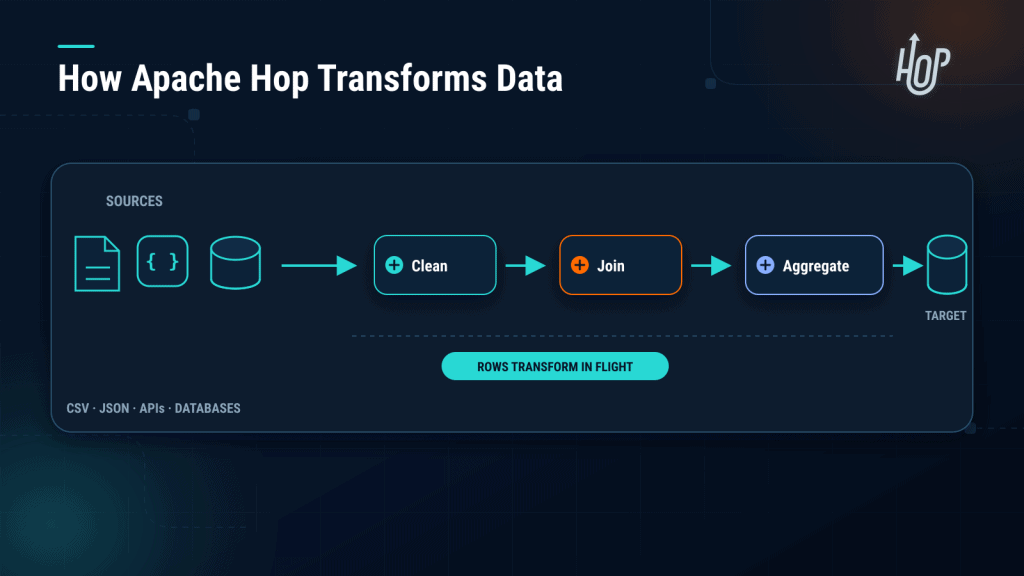
Hop’s transformation engine is a row-streaming engine. Data flows through a pipeline one batch of rows at a time, passing through a chain of transforms, and each transform does one thing: filter rows, look up values, join two streams, calculate a field, split a string, deduplicate, sort, aggregate, handle slowly changing dimensions, and so on. Hop ships with well over a hundred of these transforms.
A few things make this approach distinctive:
- Transformation happens in-flight, wherever the pipeline runs. The data does not have to land anywhere first. You can read a CSV on an SFTP server, clean it, and write it to PostgreSQL, with no warehouse in the middle.
- It is visual. You see the shape of the data flow on the canvas, and you can preview the rows between any two steps, which makes debugging very concrete.
- It is metadata-driven underneath the GUI. A pipeline is not a drawing saved as a picture, it is a set of JSON metadata describing every transform and how they connect. The GUI is just a friendly editor for that metadata. That gives you two things: pipelines diff cleanly in version control, and you can generate them programmatically. Hop calls the latter metadata injection, where one template pipeline driven by a list of metadata can copy hundreds of tables, sparing you from building hundreds of near-identical pipelines by hand.
- It works on data SQL cannot easily reach: flat files, nested JSON, fixed-width mainframe exports, API responses, message queues.
- It can also push down. When the target is a database, Hop can execute SQL directly in it and use bulk loading, so you can do warehouse-side (ELT-style) transformation in Hop too. You get both styles in one tool.
How dbt transforms data
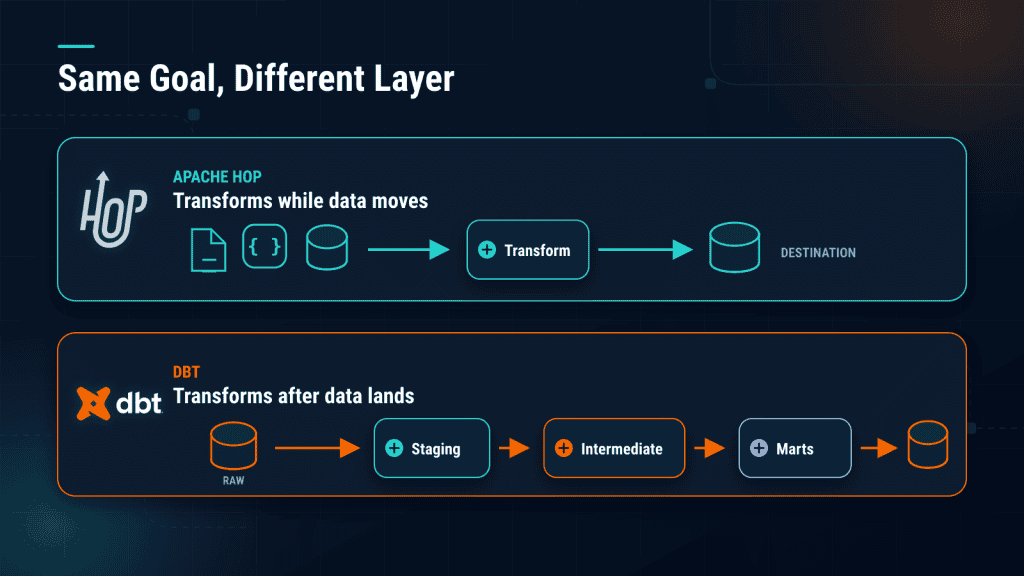
dbt’s approach is the opposite in one key way: transformation happens entirely inside the warehouse, using the warehouse’s own SQL engine. dbt never touches the data itself, it generates and runs the SQL that does.
That design gives dbt its strengths:
- Every model is a plain SQL file, so the entire transformation layer lives in version control, gets code review, and fits naturally into CI/CD.
- The DAG is explicit. dbt knows that model C depends on model B depends on model A, and it runs (and re-runs) things in the correct order automatically.
- Testing and documentation are first-class citizens. Generic tests like not-null and unique are one line of config, and docs with lineage are generated from the code.
- Incremental models and snapshots give you efficient processing of only new or changed data, and slowly changing dimension handling, out of the box.
- Reuse is built in through Jinja, macros, and packages like dbt-utils, so conventions spread across a whole analytics team.
Side by side
| Apache Hop | dbt | |
|---|---|---|
| Where transformation happens | In Hop’s engine, in-flight, wherever the pipeline runs | Inside the target warehouse |
| How you build it | Visual canvas in Hop GUI | SQL files in an editor |
| Input data | Databases, files, APIs, queues, SFTP, cloud storage | Tables already in the warehouse |
| Output | Databases, files, queues, cloud storage | Tables and views in the warehouse |
| Main skills needed | Visual pipeline design, SQL helps | SQL and Git |
| Testing and docs | Available, more manual | First-class, built in |
| Scaling up | Spark, Flink, Dataflow, EMR via Beam | The warehouse’s own compute |
Where Hop has the advantage
- It covers extract, transform, load, and orchestration in one tool. You are not required to assemble and integrate separate products for ingestion and scheduling.
- It is excellent with file-based data. Reading and writing CSV, Excel, JSON, XML, Parquet, fixed-width text, and compressed archives, from local disk, SFTP, or cloud storage, is core Hop territory. dbt deliberately stays out of this job (its seed feature only loads small reference CSVs).
- It moves data between heterogeneous systems. Database-to-database copies across different vendors, or file-to-database, or API-to-file, all without needing a warehouse as a staging area.
- It handles things SQL cannot reach: calling a REST API mid-pipeline, consuming a message queue, or parsing an unusual file format.
- The visual, drag-and-drop style lowers the barrier. Analysts and less code-centric team members can build real pipelines.
- It scales out to Spark, Flink, or Dataflow when volumes grow, without a rewrite.
- Built-in workflows give you scheduling, retries, and dependencies for batch work without a separate orchestrator.
- It is metadata-driven: you can generate pipelines dynamically from configuration, for example to copy two hundred tables by defining one metadata-driven template.
- Every capability is open source, full stop. Hop is entirely Apache 2.0 under the Apache Software Foundation, with no split between an open core and a proprietary flagship distribution.
Where dbt has the advantage
- Setup is about as simple as it gets. Install dbt, point it at your warehouse, write a SELECT statement, run it. It is the fastest route from zero to governed, transformed models.
- It speaks the analytics team’s native language. If your people know SQL and Git, they already know dbt.
- It uses the warehouse’s compute, so there is no separate engine to deploy, tune, or scale. Your data never leaves the warehouse during transformation.
- Testing, documentation, and lineage are generated from the code itself, which encourages teams to actually maintain them.
- The ecosystem is large: adapters exist for every major warehouse (Snowflake, BigQuery, Redshift, Databricks, PostgreSQL, and more), and the package hub provides battle-tested macros.
- Incremental processing and slowly changing dimensions are configuration, not custom engineering.
- It fits cleanly into software engineering practice: pull requests, CI checks, environments, and dbt Cloud for teams that want a managed experience.
The conclusion: complementary, not competing
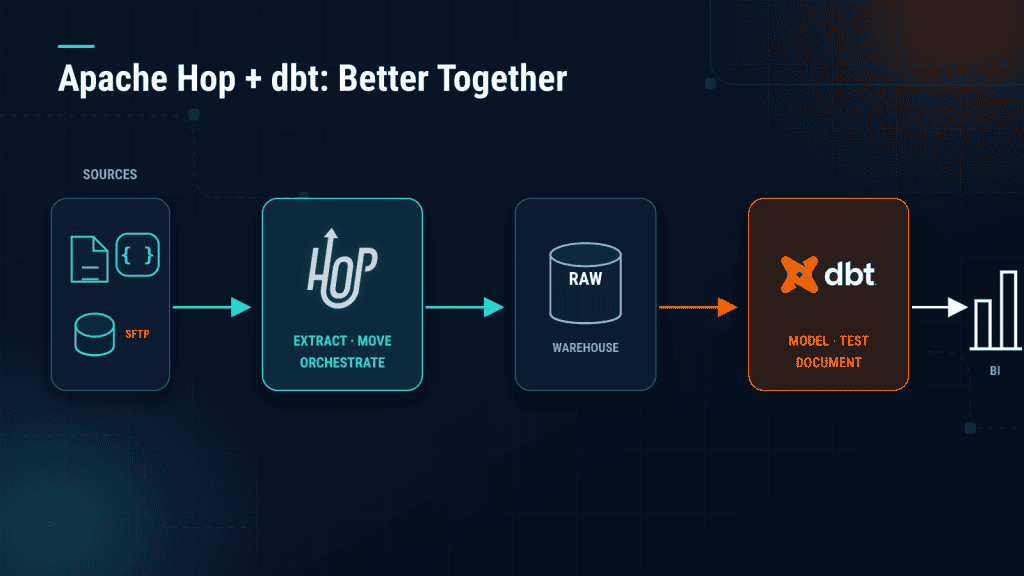
Put the two descriptions side by side and the shape of a modern data stack appears on its own:
- Hop extracts data from sources (databases, files, APIs) and loads it into the warehouse.
- dbt models that data inside the warehouse into clean, tested, documented tables.
- Reports and dashboards are built on top of the dbt models.
Each tool does the half of the job the other one chooses not to do. And they compose well in practice: a Hop workflow can trigger a dbt run through its shell action, so ingestion and modeling run on one schedule with upstream checks. Data engineers can own the Hop layer while analytics engineers own the dbt layer, each working in the paradigm that suits them.
Of course, options are sometimes limited. Maybe you only have budget, time, or skills for one tool right now. The good news is you can use either one alone:
- Hop can push SQL down into the warehouse, so it can cover in-database transformation when needed, on top of everything else it does.
- dbt, combined with whatever loading mechanism you can get, can cover a transformation-heavy workload.
But if you have to pick just one, let the nature of the work decide. If you need to move data from sources to destinations, especially file-based data, Hop is the right tool, that is the job it was built for end to end. If the work is purely transformation of data that is already loaded, and you want the simplest and quickest setup possible, dbt is the right tool.
The real question is not Hop or dbt. It is which layer of your stack each one belongs to, and used together, they cover the whole pipeline nicely.