Apache Hop takes a different approach to storing your work than most legacy data integration tools. There is no database repository holding your pipelines behind a wall. Everything in Hop is metadata, pipelines, workflows, connections and schedules, all described in plain XML and JSON files that live in an ordinary project folder. That design decision pays off the moment version control enters the picture. Because a Hop project is just files, it slots into Git as naturally as any source code repository, with full history, branching and code review.
What makes this even better is that Hop does not leave you fending for yourself with a terminal. The Hop GUI ships with built-in Git support, so a large part of the daily version control routine, checking what changed, staging files, committing and pushing, happens without ever leaving the tool. Hop even keeps you informed on its own: when a .git folder is detected in the project folder, the Git icon in the toolbar flashes red to let you know there is work waiting to be committed.
We spent time testing the Git features in Hop GUI, and this article is what we found.
Staging, committing and pushing from the GUI
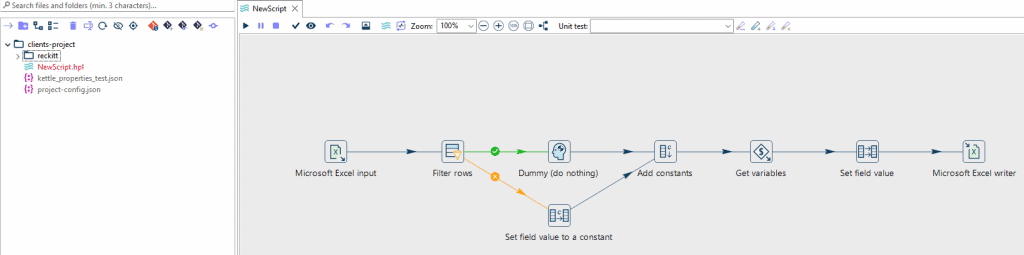
The first thing you notice is how visible the state of your project is. Files that are new or modified but not yet committed are highlighted in red in the explorer panel, so uncommitted work is impossible to miss.
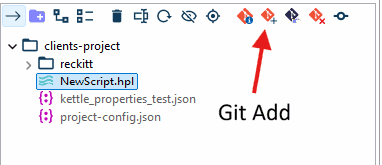
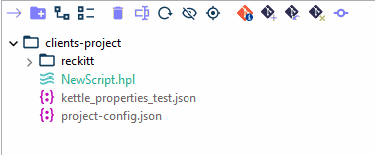
Staging a file is a one-click affair. Select the file, click the Git Add icon, and its label switches from red to green, confirming it is queued for the next commit.
The commit itself is handled in a dedicated window that lists staged and unstaged changes side by side, along with the message input. It mirrors what you would expect from any Git client.
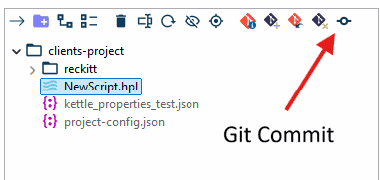
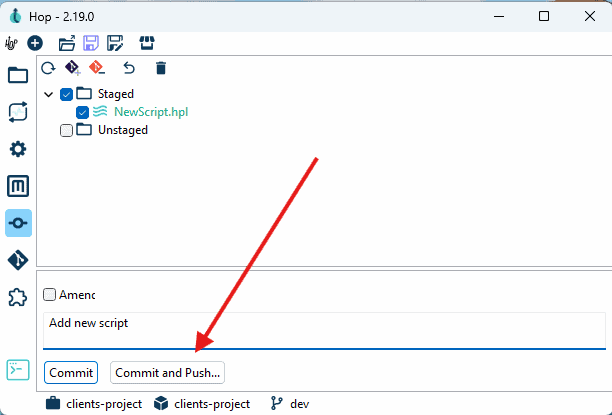
Commit and Push is a single action. Hop asks for your repository credentials, then confirms with a success window once the remote repository is in sync. For teams that were previously alt-tabbing between Hop and a separate Git client for every save, this closes a real gap in the day-to-day workflow.
Two ways to inspect changes: text diff and visual diff
Committing is only half of version control. The other half is understanding what actually changed between two revisions, and this is where Hop does something interesting.
Inside the Git Info menu, Hop offers two diff modes. The first is a standard textual diff, which shows the raw XML changes line by line. Useful for the technically minded, but reading XML is not how anyone wants to review a pipeline.
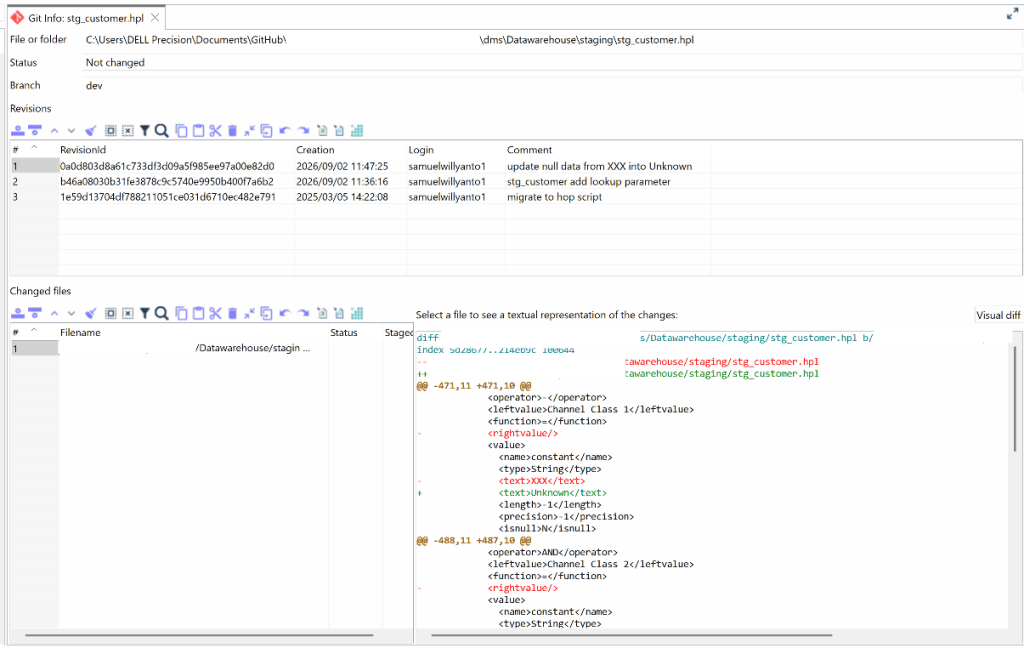

The second mode, Visual Diff, is the highlight of the whole feature set.
Side-by-side visual diff on the canvas
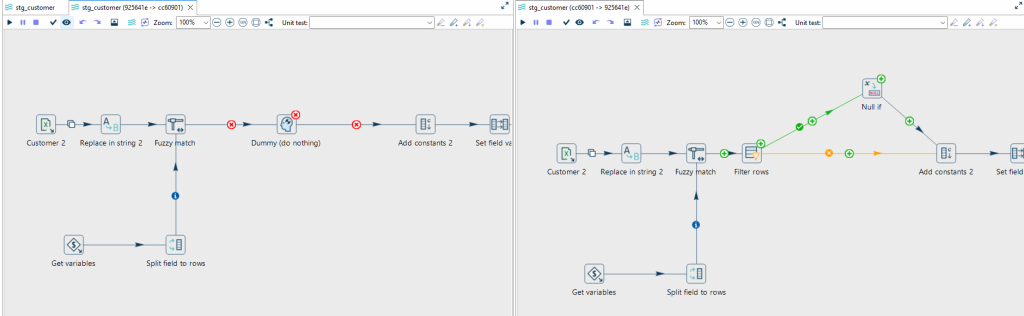
Visual Diff opens two pipeline canvases next to each other, the before and after versions of your pipeline, so you can compare revisions at a glance instead of parsing diffs.
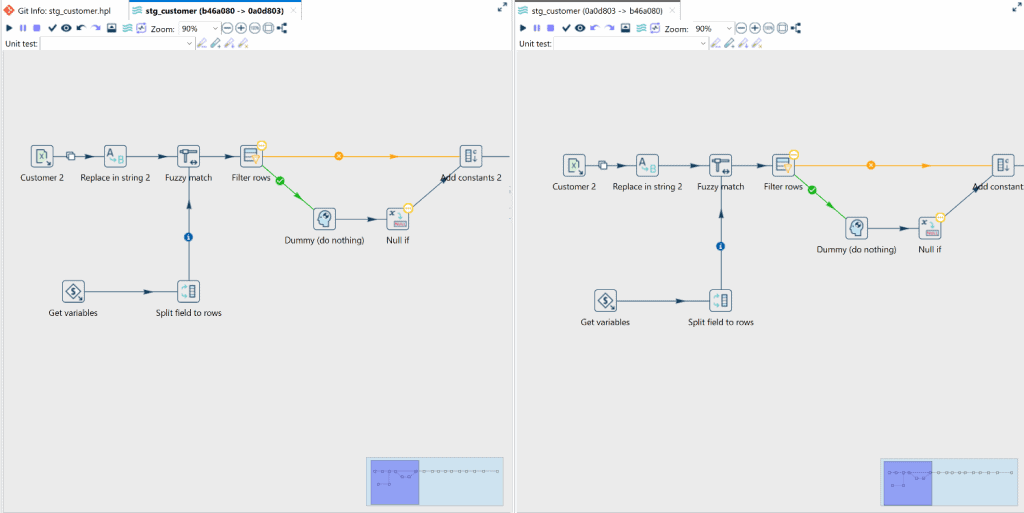
Changes are flagged directly on the canvas. Any step or transform whose configuration was updated carries a visual indicator, in our testing the yellow status badges on the Filter rows and Null if steps. Clicking a highlighted step opens its configuration dialog, where you can inspect exactly which parameters moved, for example the condition rules in Filter rows or the value assignments in Null if. Value-level changes inside a transform are surfaced through this combination of canvas badges and step dialogs, so a subtle configuration change can no longer hide inside a wall of XML.
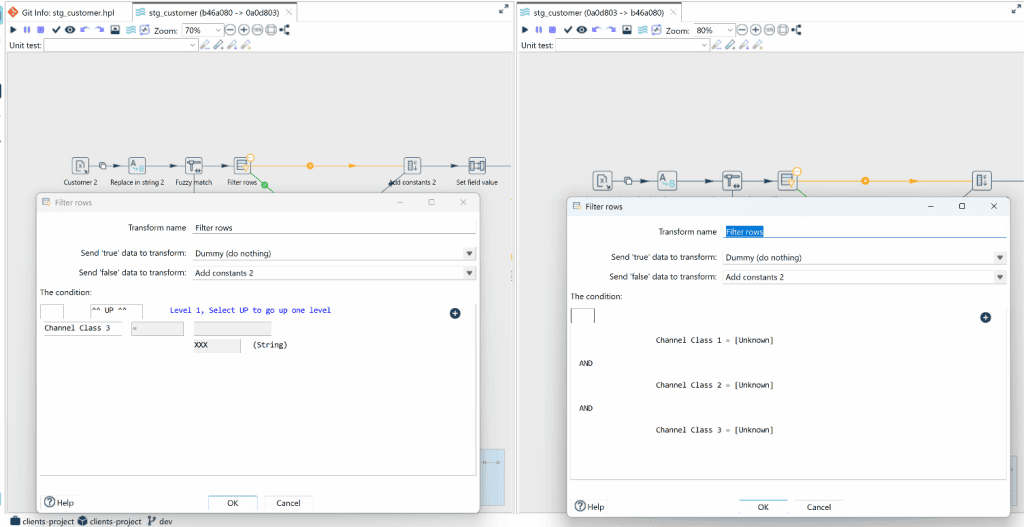
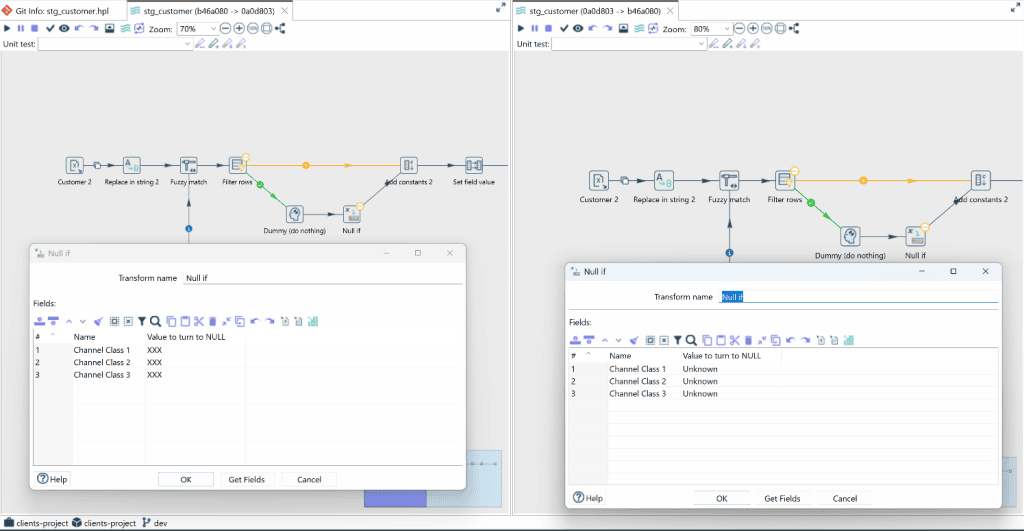
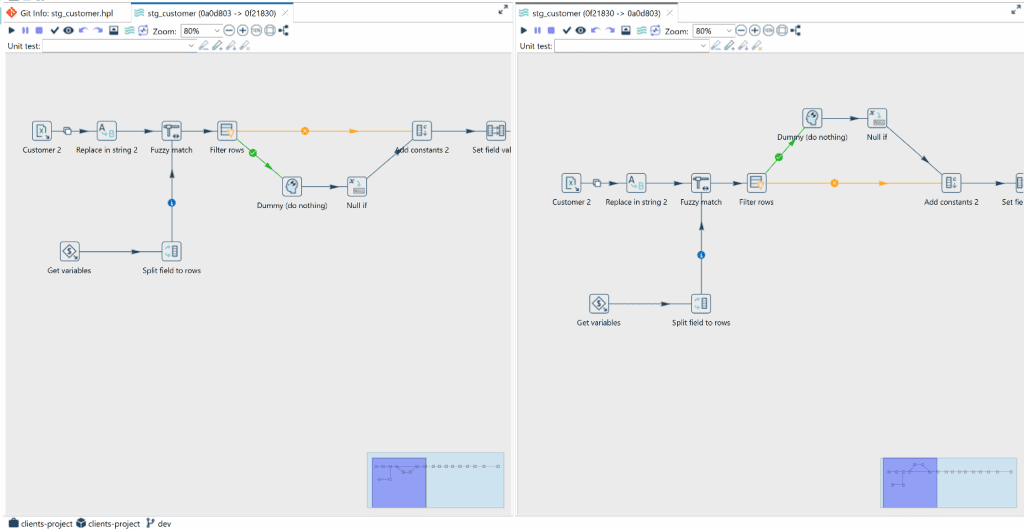
One observation from our testing: coordinate changes are treated differently. If a step was merely moved to a new position on the canvas, the new position is rendered correctly in the side-by-side view, so layout differences are visually apparent, but the step itself gets no badge or indicator. Repositioned steps keep their standard appearance, which means a coordinate-only change is easy to overlook when reviewing a revision.
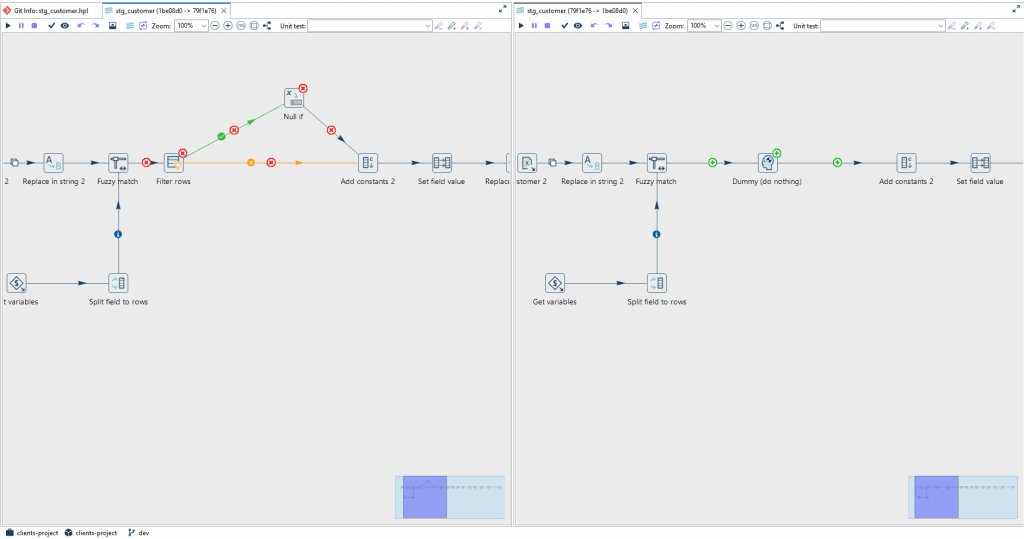
Additions and deletions, on the other hand, are impossible to miss. Removed steps, transforms and their hop links are flagged with a red X badge, newly added ones with a green + badge, and both are mapped directly onto the canvas. Reviewing a structural change to a pipeline becomes a matter of scanning for red and green, not reading XML.
Reverting to HEAD without a terminal
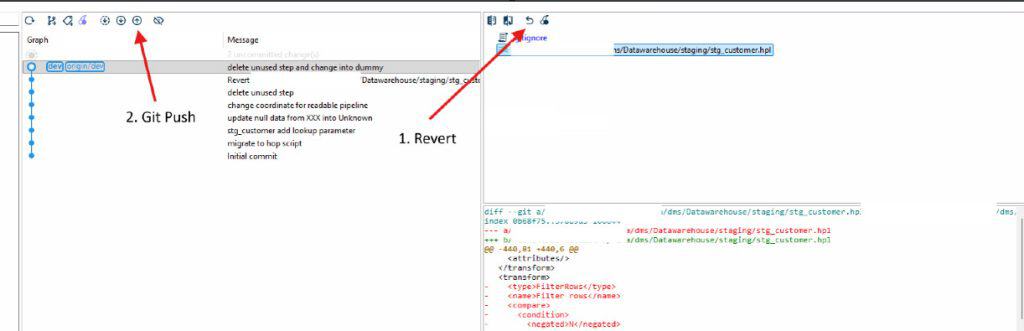
Mistakes have an escape hatch too. Hop GUI can revert uncommitted changes and reset the local file back to the latest HEAD state, no commit or push required. In practice this works well for discarding experimental canvas edits or unwanted local modifications and bringing a pipeline back to its last committed working state, again without leaving the GUI.
Where the Git support still falls short
There are gaps worth knowing before you rely on it entirely:
- Git stash is not possible from the GUI.
- You cannot run Git Init from inside Hop, the repository has to exist already.
- There is no merge support, and no merge tools.
- If a conflict appears during checkout, Hop GUI cannot resolve it, the merge conflict has to be handled outside the tool.
- Changes to step coordinates can themselves cause conflicts, which is an easy trap when two people reposition steps on the same pipeline.
None of these break the workflow for a single developer or a small team with light branching, but teams with heavier Git habits will still want a proper Git client alongside Hop for stashing, merging and conflict resolution.
Wrap-up
The metadata and XML foundation makes Apache Hop one of the most version-control-friendly data integration tools around, and the built-in Git features remove most of the friction that used to sit between designing a pipeline and committing it. Staging, committing, pushing and reverting all live inside the GUI, and the side-by-side Visual Diff turns pipeline code review from an XML archaeology exercise into something you can actually read on the canvas, with clear badges for new, modified and deleted steps.
The gaps around stash, init and merge mean it complements rather than replaces a dedicated Git client. For day-to-day work in Hop, though, the red Git icon, the green staged files and the split canvas diff are the parts you will come back to every day.
If you are coming from Pentaho Data Integration and its database-bound repository, this is one of the quiet but meaningful quality-of-life upgrades that Apache Hop brings. New to Hop altogether? Start with our earlier introduction, What is Apache Hop.